Robotics for Kids in India: Why Arduino Is the Skill That Changes Everything (Classes 6–12)
Most children only ever see code change things on a screen. Robotics is the moment code starts moving things in the real world. Here is why Arduino robotics is a game changer for students, what they build from Class 6 onwards, and how to start from home.
Robotics
Arduino
Kids Coding
STEM
Online Classes
Classes 6–12
Quick answer
Robotics for kids means wiring simple circuits and programming a small computer board, usually an Arduino, so it can sense things (light, distance, temperature) and do things (light up, beep, move a motor). Children from Class 6 can start online from home with an Arduino starter kit, with no coding needed. In 8 weeks they build a traffic light, a parking alarm and a gadget of their own. Older students in Classes 9–12 can go on to build a robot car that avoids obstacles and follows a line.
For most children, code only ever changes things on a screen. A game character jumps. A web page changes colour. It is useful, but it stays inside the computer.
Then one day they write five lines of code, press upload, and a real LED on their desk starts blinking. A week later a motor turns when they wave a hand in front of a sensor. Their code has left the screen and started moving things in the real world.
That moment changes how a child sees technology. They stop being someone who uses gadgets and start being someone who makes them. That is why I think robotics is the most exciting step a student can take after learning to code with AI.
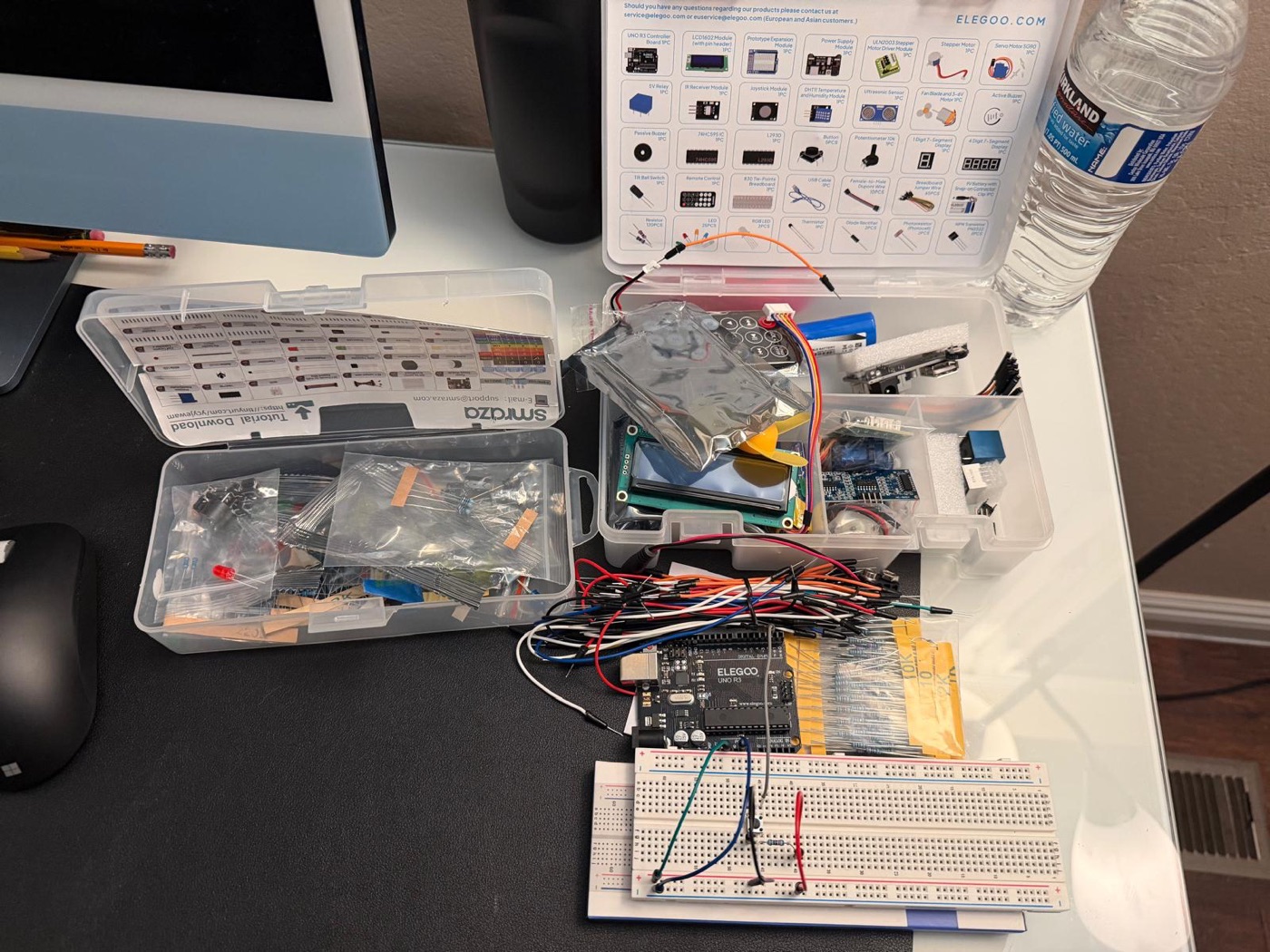
The kit students build with: an Arduino board, a breadboard, sensors, a screen and motors.
What is Arduino robotics?
An Arduino is a small, low-cost computer board used by students, hobbyists and engineers around the world. You connect parts to it on a breadboard (no soldering), write a short program on a laptop, and upload it. The board then follows your instructions on its own.
Every robot, at its heart, does three things:
Senses: light, distance, temperature, a button press, a remote control.
Thinks: the code decides what to do, using if this, then that.
Acts: lights up, shows a message, beeps, turns a motor or moves an arm.
Once a child understands this loop, they understand the basic idea behind self-driving cars, smart homes, factory robots and the devices around them.
Why it's a game changer for students
1. Physics and maths become real
Voltage, current, resistance, angles, speed and logic stop being words in a textbook. Students see a resistor protect an LED, measure distance with sound waves, and calculate how far a servo should turn. Concepts from the science syllabus finally have a reason to exist.
2. They learn to solve problems, not just follow steps
Circuits rarely work the first time. A wire is in the wrong row, a value is off, the code has a small mistake. Finding and fixing it, calmly and step by step, is the most valuable skill robotics teaches. It is exactly how engineers work.
3. It's the perfect partner for AI
Today, AI can explain any circuit and help find a bug in seconds. In robotics, students use AI the right way: to understand, plan and debug, while their own hands do the building and testing. They can't copy-paste a working robot. They have to understand it.
4. It stands out
A video of a gadget a student designed and built is a strong project for a school science exhibition, a portfolio, or a college application. It shows initiative, not just marks.
5. It points to real careers
Robotics sits where electronics, programming and AI meet: the same mix behind electric vehicles, drones, medical devices, smart factories and space technology. An early, hands-on start helps students find out whether this is their thing.
What students build in 8 weeks
In Level 1 of the Intro to Robotics course, for Classes 6–12, each week adds a new skill and a new build:
Week
What they learn
What they build
1
Circuits, the breadboard and safety
Their first blinking LED
2
Inputs and outputs
A traffic light with a button and buzzer
3
Reading sensors
A light meter that shows values on screen
4
Displays and colour
An LCD message board and an RGB mood lamp
5
Motors and movement
A waving robot arm and a fan
6
Distance sensing
A parking alarm that beeps faster as you get closer
7
Remote control, with AI as a helper
A device controlled by a TV-style remote
8
Design your own
A smart gadget of their own, shown to parents
Students keep every circuit they build, so they can keep experimenting at home long after the class ends.
Next: build a robot car (Classes 9–12)
Older students who finish Level 1 can move on to Level 2 · Advanced. Over another 8 weeks they build and program a two-wheel robot car: first it drives on command, then it avoids obstacles with a scanning distance sensor, follows a line on the floor, and takes orders from a phone app over Bluetooth. It ends with a robot obstacle-course challenge. It needs a few extra parts, a car chassis, motor driver and sensors, added to the same kit.
Can robotics really be learned online?
Yes, and in some ways it works better. Every student has their own kit at home, so nobody waits for a turn on a shared lab kit. In the live class they build along with the teacher, show their board on camera when something doesn't work, and get help right away. Between classes, the kit is right there on their desk.
What your child needs
A laptop or computer to write and upload the code.
An Arduino UNO starter kit: board, breadboard, wires, LEDs, buttons, sensors, LCD screen, servo and motors. It is bought once and the child keeps it.
No coding or electronics knowledge for Level 1: it starts from what a circuit is. Students who already code in Scratch or Python move faster.
Everything runs on USB power or a small battery at low voltage, so it is safe for students to use at home.
How to start
The Intro to Robotics course runs live online in small weekend batches, taught by me: Level 1 for Classes 6–12, and Level 2 (the robot car) for Classes 9–12. It sits alongside the AI and coding courses, which take students from the basics to real Python projects.
Book a free demo class to see how your child learns, and we'll share the exact kit list after it. If your child is new to coding, they can start with the AI courses first.
Frequently asked questions
What age is right to start robotics?+
Children can start simple Arduino projects from Class 6 (about 11 years), with no coding needed, building one small step at a time. Bigger projects like a programmable robot car suit older students in Classes 9–12, who have more patience and maths for motors, sensors and speed.
Can robotics be learned online?+
Yes. Each student has their own Arduino kit at home and builds along with the teacher in a live class. Because the kit stays with the student, they keep building between classes, which an online class makes easy.
What kit does my child need?+
An Arduino UNO starter kit: the Arduino board, a breadboard, wires, LEDs, buttons, sensors, an LCD screen, a servo and small motors. It is bought once and the child keeps it.
Is Arduino safe for children?+
Yes. Arduino projects run on USB power from a laptop or a small battery, at low voltage. Students learn basic safety in the first class and never work with mains electricity.
How does robotics help with studies?+
It turns physics and maths into something children can see and touch: circuits, voltage, speed, angles and logic. It also builds problem-solving, patience and confidence, and makes a strong project for school exhibitions and college applications.
Where does AI fit into robotics?+
AI is a helper: students use it to understand a circuit, plan a project and find mistakes in their code. They still wire and test everything themselves, so they understand how it works.